
Local Development
Summary
This document describes how to get set up for local development or test driving on a local instance of Zeeq.
The application is configure to be straight foward to run locally with minimal configuration required.
Key technologies
| Component | Technology |
|---|---|
| Frontend | Vue 3, Nuxt UI (Tailwind CSS), Pinia, Vite |
| Backend | C#/.NET 10, ASP.NET Core Minimal APIs, OpenIddict, EF Core + Npgsql, Testcontainers, TUnit |
| Database | PostgreSQL 18, pg_vector, pg_cron, pg_partman (container is defined in build/postgres/Dockerfile) |
| Messaging | Postgres, Google Cloud Pub/Sub |
Baseline setup
| Tooling | Description | Install from... |
|---|---|---|
| Mise | Manages local environment variables and tooling | brew install mise See Installing mise |
| Docker | Containerization and orchestration; Testcontainers and various other runtime containers | Docker |
mise first; that should install the other dependencies.## After installing mise, this should restore all of the tooling required for local development.
mise install
Once dotnet CLI is available, restore the tools:
# Confirm version
dotnet --version # 10.0.302

# Restore all tools
dotnet tool restore
curl -sSL https://dot.net/v1/dotnet-install.sh | bash /dev/stdin --version 10.0.302
Setting local secrets
The runtime requires several local secrets to execute the full stack.
These are managed using .NET local user secrets.
cd src/backend/Zeeq.Runtime.Server

# Non-secret settings are in  appsettings.Development.json

# Initialize the secrets store
dotnet user-secrets init

# Add secrets to the store (see: src/backend/Zeeq.Runtime.Server/appsettings.Development.json)

# (✅  REQUIRED: Needed to generate embeddings for the search)
# The API key to use for generating embeddings (always needed since there is no UI for this)
# The default embedding provider is Fireworks using qwen3-embedding-8b; this can be changed in appsettings.Development.json to use OpenAI or other providers.
dotnet user-secrets set AppSettings:Llm:Embeddings:ApiKey secret-value

# (☑️  OPTIONAL: Required or use in-app managed keys; code reviews will not work without this)
# The API key to use with the default "fast" LLM tier model.
# Not needed if using in-app configured self-managed services.
dotnet user-secrets set AppSettings:Llm:Models:Fast:ApiKey secret-value

# (☑️  OPTIONAL: Only needed for testing signed imports)
# The signing key used for importable Zeeq library export packages
dotnet user-secrets set AppSettings:Documents:LibraryExportSigningKey "$(openssl rand -base64 48 | tr -d '\n')"

# (☑️  OPTIONAL: Only needed for GH integration testing locally)
# The DEV GitHub app webhook secret (other configuration directly in file)
# This is needed to test GitHub webhook flows locally since the GH app only has one webhook URL
# Alternate: configure custom webhooks: https://github.com/zeeq-ai/zeeq-app/settings/hooks
dotnet user-secrets set AppSettings:GitHub:WebhookSecret secret-value

# (☑️  OPTIONAL: Only needed for GH integration testing locally)
# The DEV GitHub app private key PEM for local testing
dotnet user-secrets set AppSettings:GitHub:PrivateKeyPem secret-value

# (☑️  OPTIONAL: Use the mock OAuth provider without need to hook up Google or GH OAuth)
# The client secrets for OAuth providers (e.g. GitHub, Google, etc.) used for user login
# Order matches appsettings.Development.json
dotnet user-secrets set AppSettings:Auth:Providers:0:ClientSecret secret-value # Google
dotnet user-secrets set AppSettings:Auth:Providers:1:ClientSecret secret-value # GitHub

# (☑️  OPTIONAL: Use only for access to the system platform management panel)
# The account identifiers prefixed with the provider that designate system level admins
# The user will need to have an account first locally (or you already know the subject ID)
dotnet user-secrets set AppSettings:Platform:SystemAdminSubjects:0 secret-value
src/backend/Zeeq.Runtime.Server/appsettings.Development.json file.Specifically for embeddings, these are the defaults:
{
  "AppSettings": {
    "Llm": {
      "Embeddings": {
        "Enabled": true,
        "ApiKey": "dotnet user-secrets set --project src/backend/Zeeq.Runtime.Server AppSettings:Llm:Embeddings:ApiKey secret-value",
        "Endpoint": "https://api.fireworks.ai/inference/v1",
        "model": "accounts/fireworks/models/qwen3-embedding-8b"
      }
    }
  }
}
Set these based on your preferred embedding provider.
src/backend/Zeeq.Runtime.Server/appsettings.Development.json carefully to configure other optional settings. At this point of configuration, only the doc library embeddings will be working. Local code reviews require configuration of the AppSettings:Llm:Models:Fast:ApiKey secret value to work locally. For GitHub integration, you will need to register a GitHub app and configure the AppSettings:GitHub:WebhookSecret and AppSettings:GitHub:PrivateKeyPem values to test locally. For local testing of Google and GitHub OAuth, you will need to configure the AppSettings:Auth:Providers values with your own client IDs and secrets.Starting the runtime
Zeeq runs using Aspire as the orchestration layer which launches all processes and containers.
Assuming you have mise set up properly, switching into the source directory:
# Smoke test
dotnet --version. # 10.0.302

# Start aspire which will start the stack
aspire run --detach --non-interactive

# To stop the stack since it is detached in the background
aspire stop
The Aspire stack is now at http://localhost:15010:
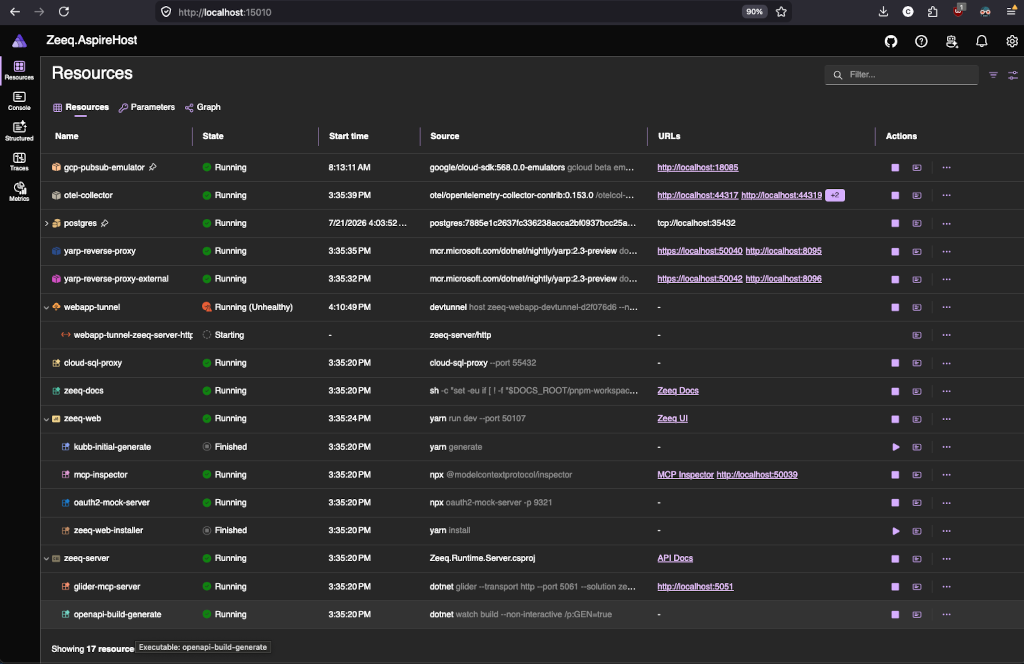
The application uses YARP to run on the following endpoints:
| Endpoint | Description |
|---|---|
| http://zeeq-web.localhost:8095 | The main application entrypoint |
| http://zeeq-docs.localhost:8095/docs | The local docs app backed by the docs-root Aspire parameter |
| http://zeeq-api.localhost:8095/scalar | The local Scalar UI for the API |
| http://zeeq-inspector.localhost:8095 | The local MCP inspector UI for the API |
127.0.0.1       zeeq-web.localhost
127.0.0.1       zeeq-api.localhost
127.0.0.1       zeeq-docs.localhost
127.0.0.1       zeeq-inspector.localhost
Connecting
Follow the guide in Connecting Agents but use the endpoint: http://zeeq-web.localhost:8095/mcp as the target.
Common problems
gcp-pubsub-emulator) to be ready. This container may take a bit of time to download. You may occasionally need to run aspire stop and aspire run --detach --non-interactive again to reconnect to the container.devtunnels integration with Aspire or using ngrok yourself.devtunnel has a relatively short lifetime so you are likely going to need to reauthenticate once a day.aspire stop and aspire run --detach --non-interactive again to reconnect to the container.aspire stop and aspire run --detach --non-interactive again to reconnect to the container.Normal development workflow
During normal development, you should not need to manually stop and start the Aspire stack.
On rebuilds:
# Rebuild and restart the resource.
aspire resource zeeq-server --rebuild
When changes are made in the backend, the API stubs are automatically re-generated via a .NET background build process that will output the OpenAPI schema to src/web/src/api/zeeq-api.json. Kubb is used to generate the client stub from here.
Build and test
Typical operations for building and testing:
dotnet build && dotnet test --no-restore --no-build
The tests use Testcontainers; Docker is required!