
Session Telemetry
Summary
Connect support agent harnesses to the Zeeq telemetry endpoint to capture session-level information that can be incorporated into the dashboard and code review records.
Clients with native telemetry support:
- Codex / ChatGPT
- Claude Code / Claude
- VS Code Copilot
These can be pointed directly at the Zeeq telemetry endpoint via native configuration.
Other harnesses like OpenCode, Cursor, and Pi can use OpenTelemetry plugins or directly connect to the Zeeq ingest API endpoint.
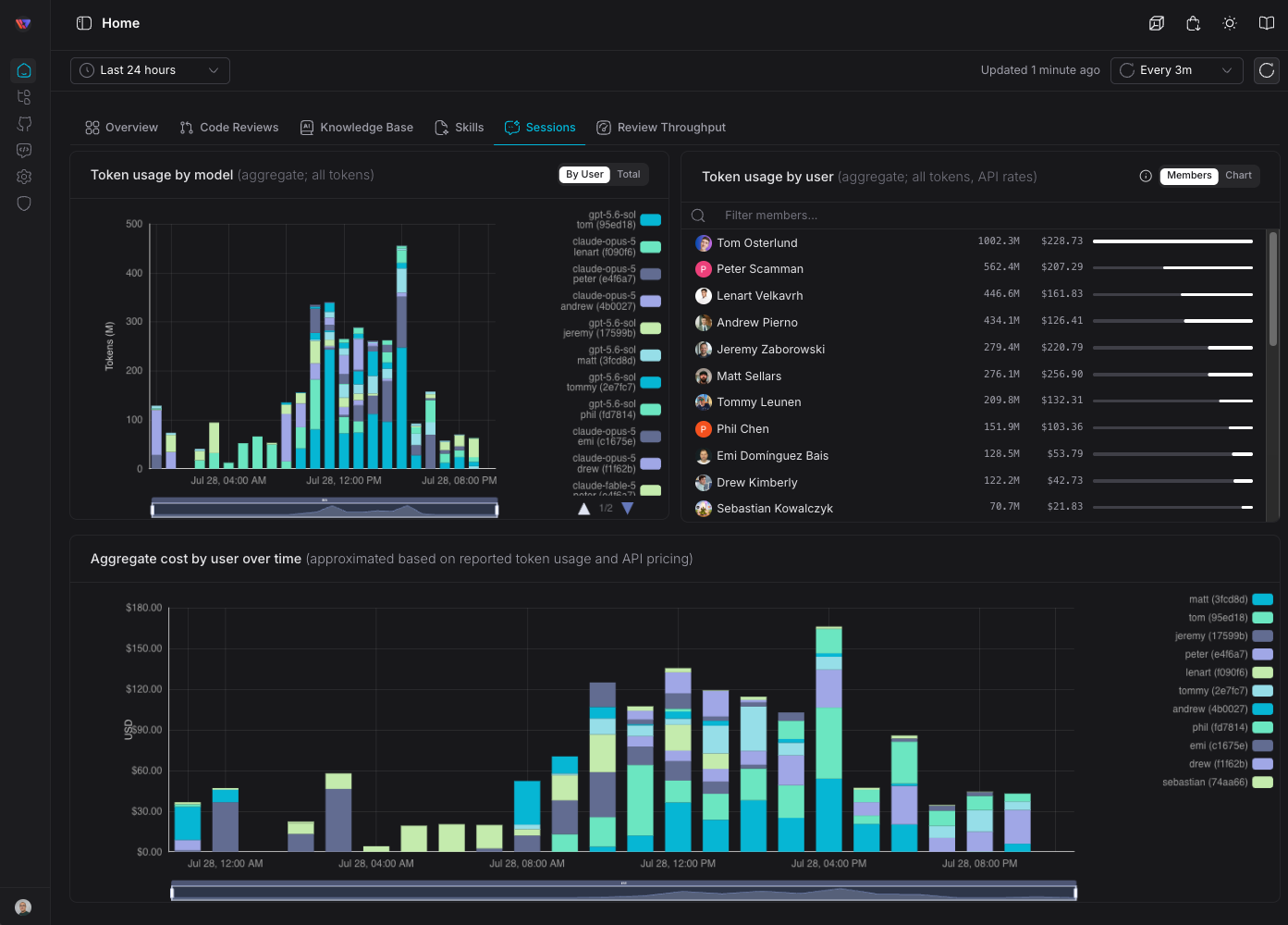
Session telemetry captures:
- Conversation roots
- Session prompts and MCP tool usage (it does not capture local tool usage)
- Token usage and cost (calculated based on API rates)
- And option to produce PR level provenance linking to a session by linking the
Configuring Codex
~/.codex/config.toml. See OpenAI Advanced Config and Config Reference for details.Point your Codex client OTEL configuration to the Zeeq OTEL endpoint.
[otel]
environment = "dev"
trace_exporter = "none"
log_user_prompt = true

[otel.exporter."otlp-http"]
endpoint = "https://otel.zeeq.ai/v1/logs"
protocol = "binary"

# Codex currently requires the OTLP Authorization header to be encoded directly;
# substitution will not work correctly.
# Mint this token: https://app.zeeq.ai/web/settings/credentials
[otel.exporter."otlp-http".headers]
authorization = "Bearer <ZEEQ_ACCESS_TOKEN_HERE>"
If log_user_prompt is set to true, the client will log the user prompt and the model response to the OTEL endpoint.
Codex responds with the conversation ID reliably when prompted:
Print your current conversation/session ID.
Or more precisely:
printenv CODEX_THREAD_ID

# Or...
env | rg '^CODEX_THREAD_ID='
Configuring Claude
Claude can be configured either project local or globally; it is recommended to use project local configuration.
Create an access token
Visit https://app.zeeq.ai/web/settings/credentials and create a new API token.
Store this in your local environment as ZEEQ_ACCESS_TOKEN_HERE in your shell file (.zshrc, .bashrc, $PROFILE, etc.).
Configure dynamic headers
Then add a dynamic token loader in you project local .claude directory:
#!/usr/bin/env bash

# See: https://code.claude.com/docs/en/monitoring-usage#dynamic-headers
printf '{"Authorization":"Bearer %s"}\n' "$ZEEQ_ACCESS_TOKEN_HERE"
Ensure it is executable:
chmod +x .claude/zeeq-otel-headers.sh
source ~/.zshrc or source ~/.bashrcConfigure project local settings
{
  "otelHeadersHelper": ".claude/zeeq-otel-headers.sh",
  "env": {
    "CLAUDE_CODE_ENABLE_TELEMETRY": "1",
    "OTEL_EXPORTER_OTLP_PROTOCOL": "http/protobuf",
    "OTEL_EXPORTER_OTLP_ENDPOINT": "https://otel.zeeq.ai",
    "OTEL_LOGS_EXPORTER": "otlp",
    "OTEL_LOG_USER_PROMPTS": "1",
    "OTEL_LOG_TOOL_DETAILS": "1"
  },
  "otherConfigHere" : "..."
}
/v1/logs path in the endpoint; it will automatically append it.Like Codex, you can also set the header directly instead of using the helper:
{
  "env": {
    "OTEL_EXPORTER_OTLP_HEADERS": "Authorization=Bearer <ZEEQ_ACCESS_TOKEN_HERE>",
  }
}
This is the most straightforward way as long as .claude/settings.local.json is gitignored and not checked into source control.
Claude can respond with the conversation ID when prompted for:
Get your conversation ID from the current active scratchpad path.
VS Code Copilot
Direct import (Pi, Cursor, OpenCode, etc.)
Several harnesses do not have native OTEL support and must use either plugins that emulate OTEL or write a custom hook.
If preferred, for these harnesses, it is possible to use the Zeeq telemetry import API directly and send a JSON payload.
Pi
Zeeq publishes a first-party Pi extension that posts session telemetry directly to the Zeeq import API so no OTEL config or hook script required. You can check the source of the hook to write a custom extension for other harnesses.
Install the extension
The extension is published to npm as @zeeq-ai/zeeq-app-pi-telemetry. Run this from the root of the repository you want to emit telemetry from:
pi install --local npm:@zeeq-ai/zeeq-app-pi-telemetry
To track patch releases automatically while holding the minor version, pin a tilde range instead:
pi install --local "npm:@zeeq-ai/zeeq-app-pi-telemetry@~1.0.1"
Pi writes the package source to .pi/settings.json. Approve the project-local package so Pi trusts and loads it:
pi --approve
Create an access token if using DCR
Visit https://app.zeeq.ai/web/settings/credentials and create a new API token if you are using dynamic client registration (DCR) for your authentication.
Store it in your shell profile (.zshrc, .bashrc, $PROFILE, etc.) as ZEEQ_ACCESS_TOKEN:
export ZEEQ_ACCESS_TOKEN="<token>"
source ~/.zshrc or source ~/.bashrcStart a session
No further configuration is required — the extension sends telemetry to Zeeq's hosted endpoint by default as soon as ZEEQ_ACCESS_TOKEN is set. Start Pi as normal in the trusted project and telemetry uploads automatically in the background.
Configure prompt text privacy
By default, the Pi extension exports prompt text. To omit prompt text while keeping prompt length metadata, set:
export ZEEQ_OTEL_OMIT_PROMPT="1"
When enabled, prompt_text is exported as omit_by_config.
To keep only a prefix of each prompt, set:
export ZEEQ_OTEL_TRUNCATE_PROMPT="32"
Truncated prompt text is exported as the retained prefix followed by ...(truncated_by_config). A value of 0, an empty value, or an omitted variable disables config truncation. Positive values below 16 are treated as 16.
Troubleshooting
Confirm the extension is installed and trusted:
pi list
Enable export error logging so failed uploads print to stderr instead of failing silently:
export PI_TELEMETRY_LOG_ERRORS="true"
Force an immediate upload instead of waiting for the batch timer, using the extension's own command from inside a Pi session:
/telemetry-flush
401 on export almost always means ZEEQ_ACCESS_TOKEN is missing, expired, or shadowed by another token exported earlier in your shell profile (later exports win). Re-mint a token at https://app.zeeq.ai/web/settings/credentials if unsure.Raw API shape
The API endpoint for this is available at https://app.zeeq.ai/api/v1/telemetry/import and requires an Authorization: Bearer <token> header with a valid Zeeq API token.
The payload shape:
{
  "conversation_id": "conv_local-session-abc123",
  "harness_name": "my-harness",
  "harness_version": "1.4.0",
  "repository_remote_url": "https://github.com/my-org/my-repo",
  "head_branch": "main",
  "head_sha": "a1b2c3d4e5f6a1b2c3d4e5f6a1b2c3d4e5f6a1b2",
  "events": [
    {
      "kind": "Prompt",
      "event.timestamp": "2026-07-24T14:35:07.281Z",
      "prompt_text": "Tell me a joke",
      "prompt_length": 15,
      "gen_ai.request.model": "gpt-5.5"
    },
    {
      "kind": "ToolResult",
      "event.timestamp": "2026-07-24T14:35:08.512Z",
      "gen_ai.tool.name": "bash",
      "gen_ai.tool.call.id": "call_1",
      "gen_ai.tool.call.arguments": { "command": "ls" },
      "gen_ai.tool.call.result": "README.md\nsrc/",
      "gen_ai.tool.call.duration_ms": 42,
      "gen_ai.tool.call.success": true
    },
    {
      "kind": "Completion",
      "event.timestamp": "2026-07-24T14:35:10.208Z",
      "gen_ai.request.model": "gpt-5.5",
      "gen_ai.usage.input_tokens": 4267,
      "gen_ai.usage.cached_tokens": 0,
      "gen_ai.usage.output_tokens": 66,
      "gen_ai.usage.reasoning_tokens": 0,
      "zeeq.cost.usd": 0.023315
    }
  ]
}
conversation_idandharness_nameare required at the top level;eventsmust contain at least one entry.harness_version,repository_remote_url,head_branch, andhead_shaare optional but power PR-level provenance linking — send them when available.- Each event's
kindis one ofPrompt,ToolResult, orCompletion. SendPromptfor user input,ToolResultper tool call, andCompletiononce per model response with token counts. zeeq.cost.usdis optional. When your client can report a provider-normalized cost, send it and Zeeq treats it as authoritative; otherwise Zeeq estimates cost from token counts.
user.email or organization_id field sent on an event is ignored — Zeeq always attributes the request to the identity behind your bearer token.