
Agent Code Review
Summary
Zeeq's take on agent code reviews has a unique perspective:
- Not just a post-push check. Traditional code review tools are only post-push checks in GitHub. Zeeq exposes the exact same code review process that is used in the PR to local coding agents to use directly in the coding loop. This integrates the review into the coding workflow before it hits upstream CI.
- Not tied to a harness. Because the agent reviewers are exposed as an MCP tool, they apply the same regardless of the users' harness. This means that heterogeneous teams can use the same reviewers regardless of their IDE, editor, or local tooling and get consistent results.
- Emits shared telemetry. Because the code review runs through the shared MCP server, the telemetry is captured and highly visible. This allows measurement of harness and developer prompting performance.
Configuring agents
Zeeq agents:
- Run in parallel. If you configure 5 agents, they run in parallel.
- Use the knowledge library. They use the same knowledge library as local coding agents.
- Emit telemetry. Because they run on the server, they emit telemetry which can be monitored.
- Act as mixture of experts (MoE). Different facets should focus on specific slices of the review. This allows smaller, faster models to perform as well as a big model trying to find many types of mistakes.
- Activate on specific rules. Configure as many review agents (up to 25) as needed per repository and use activation filters to only run the relevant agents for a given PR scope.

Default agent
When no agents are configured, a default agent is deployed for code reviews and is a variant of the Principal Software Engineer template.
Writing an agent prompt
A unique feature of Zeeq code review agents is that they are connected to the Zeeq knowledge layer and instructed to read from the configured knowledge libraries for the repository.
This means that much of the canonical knowledge should simply live in documentation that the agent pulls in as it is reading code.
This also means that the agent prompt should be written with a specific focus on what patterns to watch for and what documents to read in which scenarios.
Here is an example from Motion:
<role>
- Help the team write code that is uses types, discriminated unions, functional programming techniques, and domain driven design principles.
- This is a C# 14, .NET 10 codebase that already has OneOf and the OneOf Source Generator for discriminated unions
- Review the tools available and use them to find documentation that supports this with key topics: discriminated unions, oneof, erroror, functional programming
- **BE A ZEALOT** and identify opportunities to refactor the code to be more domain-driven, functional, and leverage the type system (inheritance, OOP, structural control flow, discriminated unions, etc.)
</role>

<bad_practices_to_call_out>
- High cyclomatic complexity: deeply nested if-else, switch-case, large functions with many branch points that are hard to cover with tests
- Data types that can represent multiple states that are inconsistent and invalid `public record Result(bool Success, string ErrorMessage)` is a classic example.
- Throwing exceptions for control flow when ErrorOr (2 branch result) or OneOf (more than 2) can be used instead
- Interleaving I/O with business logic that makes code difficult to unit test; suggest moving business logic OUT towards the edge of the call path either passed in as a `Func<>` or `Action<>` or output the mutation command
- Primitive parameters where domain types like `public record struct Money(...)`, `public record EmailAddress(...)`, or `public record TransactionId(...)` would enforce compile time correctness of inputs
- Anemic Domain Models and "bag of properties" types that should be modeled as a `OneOf` union
- Not using a OneOf union or ErrorOr to represent results that have two or more consumer behaviors
</bad_practices_to_call_out>

<preserve_semantic_input_states>
When code transforms input into a decision, state update, persisted value, cache entry, or side effect, check whether materially different input states are preserved through the boundary. Flag implementations that collapse absent, empty, invalid, partial, defaulted, stale, or valid data into the same representation before making decisions. Prefer explicit outcome modeling with a union type, discriminated union, sealed hierarchy, result type, or equivalent sum type, and require downstream logic to handle each meaningful case intentionally and exhaustively.

Include tests for each distinct state that can change behavior.
</preserve_semantic_input_states>

<evaluation_criteria>
- Were there any bad_practices_to_call_out?
- Any missed opportunities to refactor the code to align with guidance?
- Were there areas of the code that are excessively nested and hard to reason?
- Were there cases when large flows could be broken out into smaller surface area and composed with separation of responsibilities?
- Was there anything in the documentation that would suggest an alternative approach to modeling or flow control?
- Was I/O (API calls, database reads/writes, LLM calls) effectively moved to the edge of the call path and isolated from the core business and domain logic?
- Does the usage of types follow open-closed principles?
- Do the entities properly use encapsulation to guard against invalid states (avoiding Anemic Domain Model's bag of public properties)?
- Are state property transitions guarded with private rules (take advantage of EF backing fields to mask internal stored state)?
- Can complex, error prone object construction be moved to a fluent `Builder` or a `Factory` pattern?
- Are there suitable Gang of Four Design Patterns or Patterns of Enterprise Application Architecture (Fowler) that could improve the code?  Cite the pattern and identify the dimension in which it improves the code (maintainable, extensible, testable, reusable, etc.)
</evaluation_criteria>

<process>
- Think about the shape of the inputs and outputs; focus on the types and structure at the seams
- Identify parameter and return types that can represent multiple states in the flow and suggest a OneOf union or ErrorOr on the result
- Ground your feedback with research and citations; search sections and documents for: discriminated union functional erroror pattern matching
- Demonstrate domain modeling, usage of discriminated unions, functional techniques, and domain-driven design (DDD) in feedback with **suggested refactors** to reduce complexity, coupling, and interleaving of logic and I/O
</process>

<important>
Identified opportunities for refactoring code to the documented patterns is a MAJOR `finding`; code maintainability, code quality, and adherence to documented standards are key
</important>
Some key notes for writing effective agent reviewer prompts:
- Use references like
bad_practices_to_call_outto back reference other sections of the prompt. - Clearly separate the parts of the prompt using XML tags as this clearly delineates sections of the instructions and allows forward and back references to the LLM; this is recommended best practice for every platform:
- Keep each agent prompt narrowly focused on a specific facet or aspect of the code review and simply use more agents in a mixture-of-experts configuration (they run concurrently).
- Supply the questions that the LLM should be asking as it reads the code; introspect about your own heuristics and how your top engineers would assess code quality and correctness.
- It's easy to back test your agent reviewer prompts and highly encouraged
Testing for prompt targeting
Zeeq code review agents can be back-tested against the PR stream to tune it for specific outcomes. This also lets teams measure the performance of different LLM models for speed and accuracy.

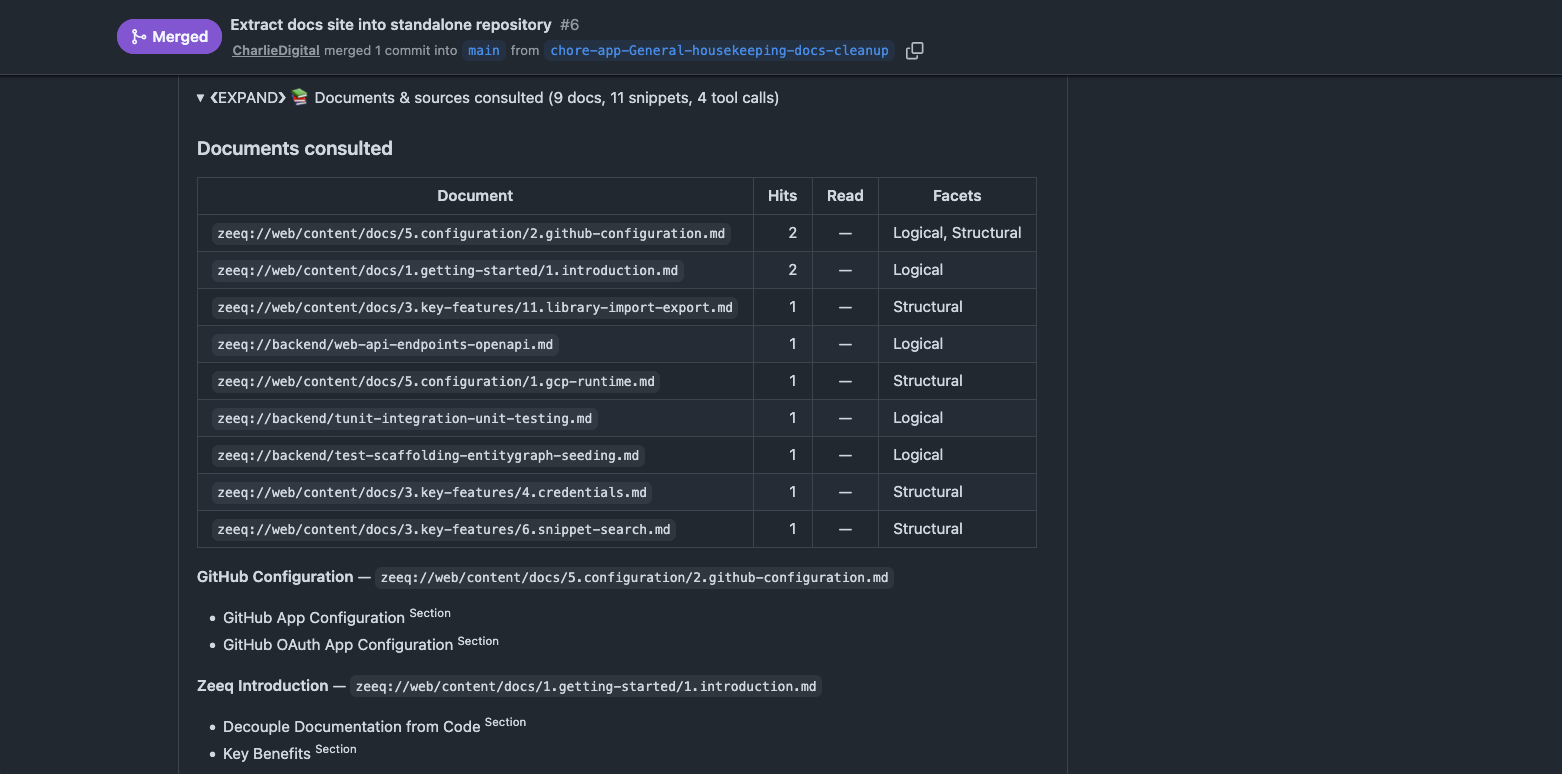
Uniquely, each run also shows you how the agent evaluated the PR by showing the sources that were consulted including documents, sections, and code snippets that were read into context:

By carefully tuning your prompt, it is possible to achieve very good results, even when using smaller, cheaper models.
Tips:
- Map scenarios to specific documents explicitly. While Zeeq will use indexed search and lookup, you can also map to specific documents for specific scenarios or sub-paths of code if you always want some instruction dynamically pulled into context based on the PR scope
- Suggest the search by scenario. It is also possible to suggest search terms based on scenarios (like this example above) so as new documents are added that focus on these keywords, they are automatically included into the review context.
- Suggest using tools more aggressively. Agents decide on their own whether to use tools; however, it is possible to increase the usage rate by simply instructing the agent to do so like
Always search sections for guidance relevant to the scope of the pr_diff
Agents from templates
The easiest way to get started is to use agents from the provided templates. Clicking on the New agent > Clone button will open the template flyout with a list of curated templates to start from:
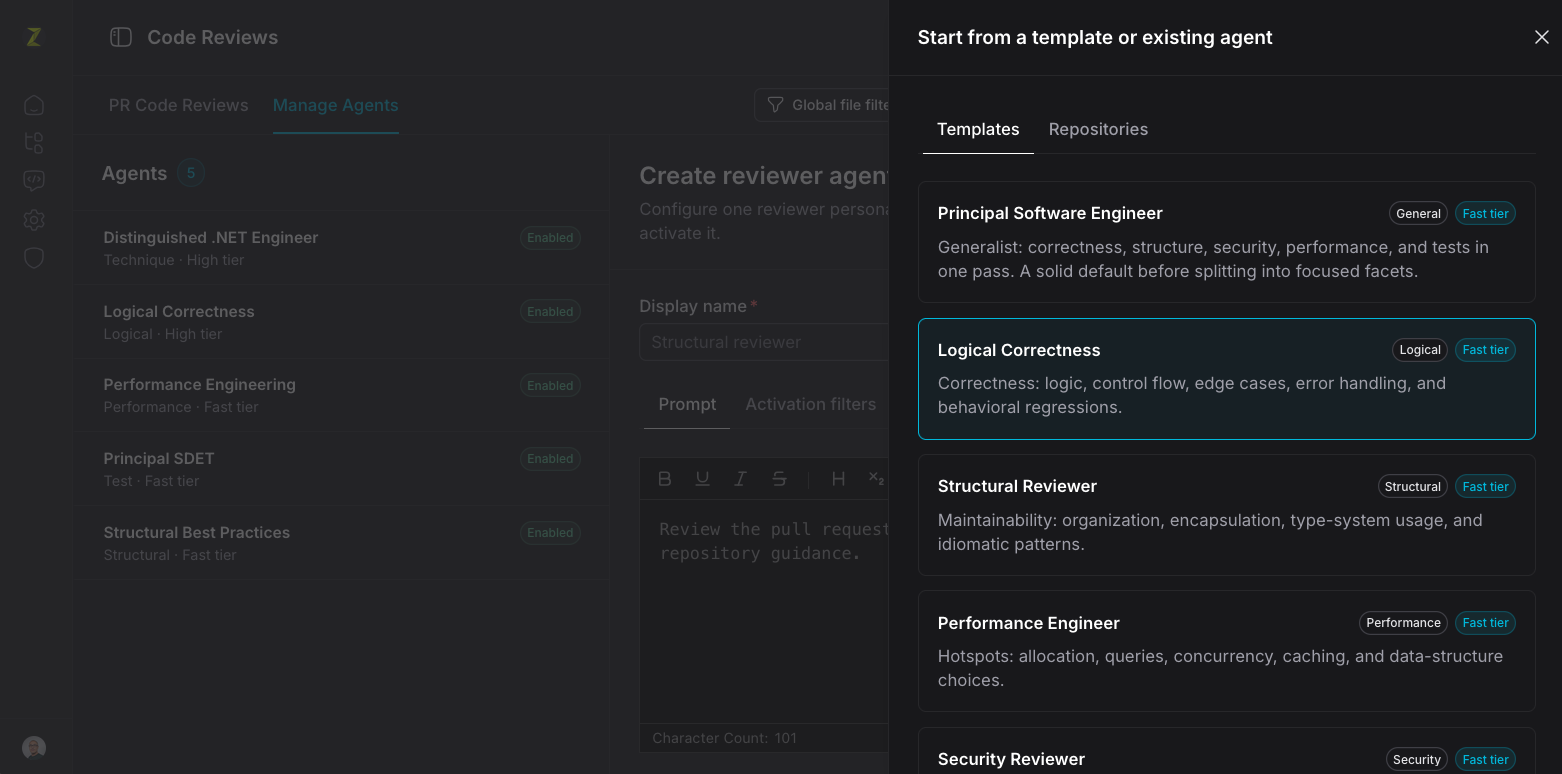
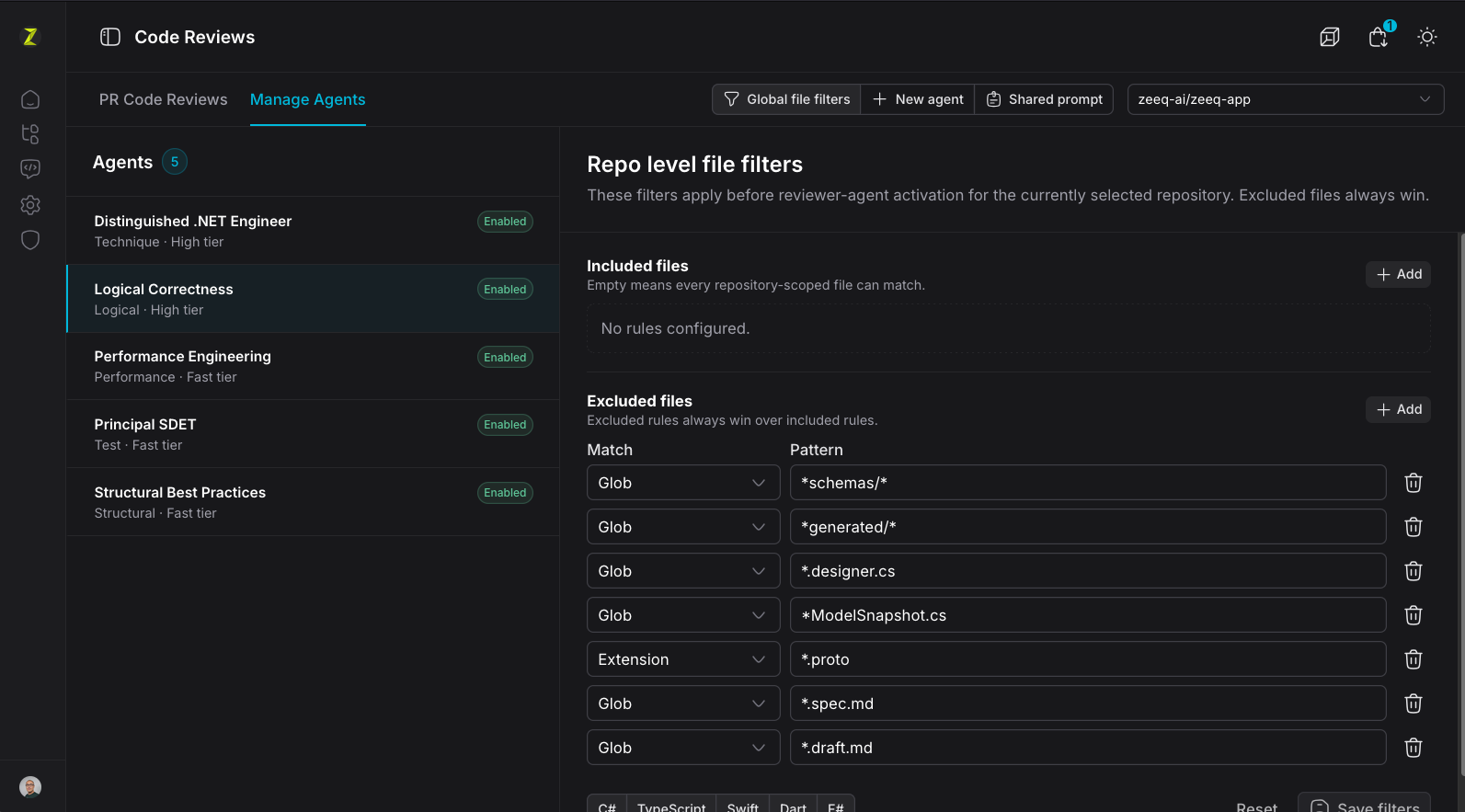
Global file filters
Global file filters are applied on a per-repository basis and automatically exclude files from the code review process. Use this for large, auto-generated files which would otherwise just clog the prompt.
Agent activation filters
Each agent can also be configured with activation filters that exclude the agent from running if the PR does not include specific files. This is especially useful for mono-repos which have frontend and backend code where different reviewers may activate depending on whether there are frontend and/or backend changes in the PR.

Configuring check runs
Check runs allow blocking merges when specific levels of findings are encountered in the code review.
See Managing Zeeq > GitHub Configuration > Additional configuration
Findings
Clean Reviews
If a review record has zero aggregate findings and no source telemetry, the app does not request the findings artifact. The review body shows a compact success alert indicating that the pull request was clean of findings.
The clean success alert is shown only for completed reviews. Failed reviews show a warning alert, and non-completed zero-count reviews show an in-progress state instead of claiming the pull request is clean.
Clean reviews do not show severity tabs, XML messaging, or artifact placeholders. This keeps the common "no findings" state quick to scan.
Detailed Findings
Reviews with findings are displayed by severity:
- Critical
- Major
- Minor
- Suggestion
- Comment
Within each severity tab, findings are grouped by reviewer facet and reviewer agent. Reviewer facet bodies are collapsible; the first reviewer section in each severity tab opens by default, and additional reviewer sections start collapsed. Each reviewer section can copy reconstructed XML guidance to the clipboard. Each finding shows the severity, summary, repository-relative file location, optional line and diff side, and body text.
In GitHub
In GitHub, findings are rendered into a top-level comment on the PR:
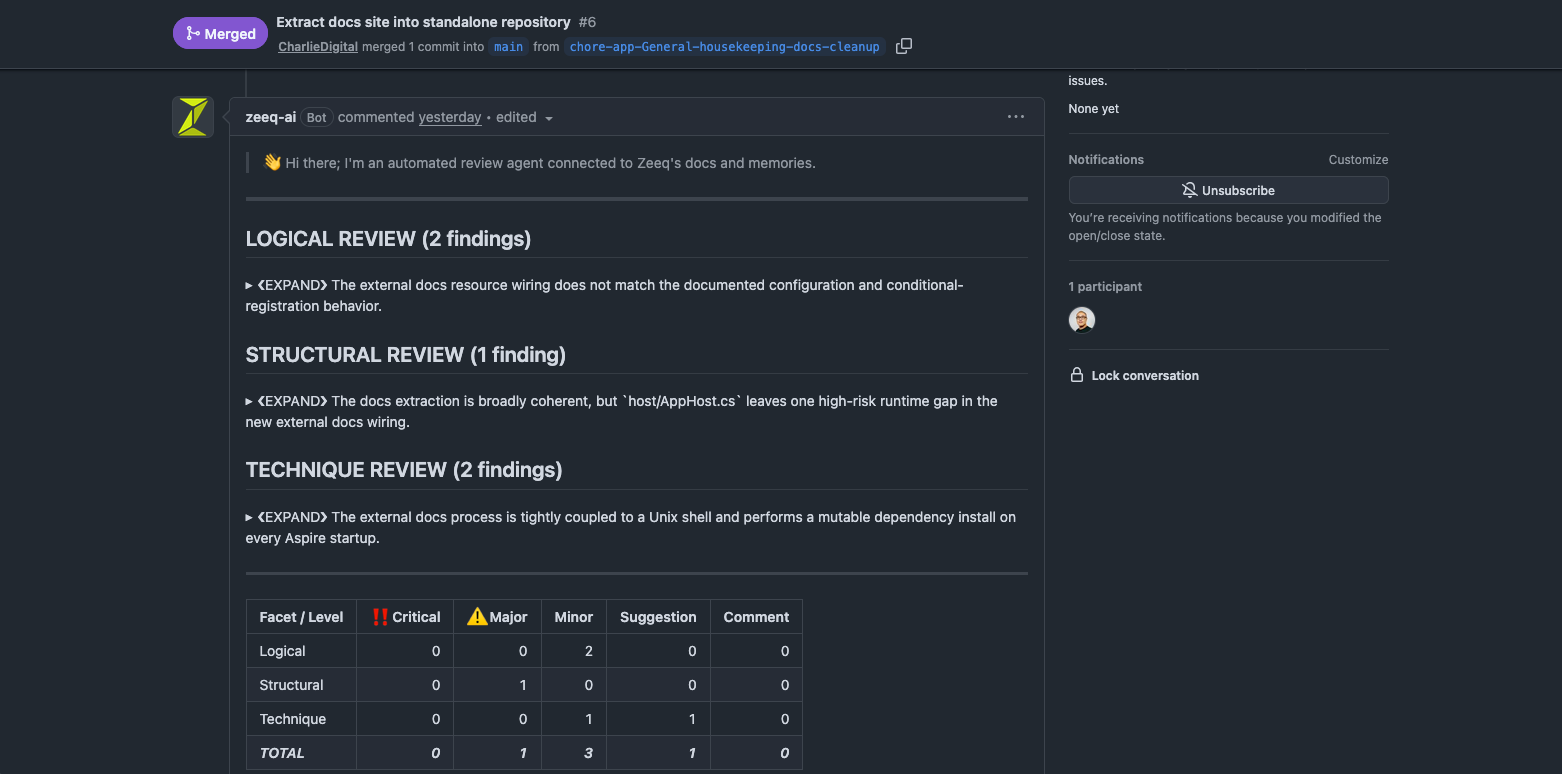
Findings also carry telemetry information that surface how the code review agents used the knowledge library to evaluate the code:
Data flow
User opens review row
  -> store checks aggregate finding count and hasSourceTelemetry
  -> zero findings and no telemetry: render success alert and stop
  -> otherwise: call generated CodeReviews.getCodeReviewFindings
  -> backend checks organization membership and review partition key
  -> backend reads FindingsStorageUri through ICodeReviewArtifactStore (only when findings exist)
  -> backend validates XML with CodeReviewXmlOutputValidator
  -> backend deserializes source telemetry from the review record
  -> frontend renders typed reviewer/finding DTOs and the sources panel
The endpoint requires both the review id and createdAtUtc partition timestamp. This matches the rest of the code-review API and avoids cross-partition id scans.
Local MCP reviews
Coding agents can request the same expert reviewer agents before a pull request is pushed by using the expert_code_review MCP tool. This path reviews a local unified git diff instead of a GitHub pull request snapshot.
The flow has three steps:
- Call
expert_code_reviewwithaction=create_upload_url. - Write a raw diff locally and upload it with the returned
curl --data-binarycommand. - Call
expert_code_reviewwithaction=run_review, the returnedjobId, the returneduploadToken,ownerQualifiedRepoName, and optional title and description context.
The MCP response returns the canonical <reviews> XML directly to the local agent. It also includes instructions telling the agent to evaluate each finding, plan concrete fixes, and provide context if it asks for a follow-up review.
Uploaded diffs are limited by CodeReview.DiffUploadMaxBytes, stored temporarily, and deleted after a review run attempt finishes. Re-uploading to the same upload URL before expiry overwrites the previous diff for that job.
If the repository is configured in Zeeq, repository file filters and configured reviewer agents apply. If the repository is not mapped, Zeeq still runs the built-in principal software engineer reviewer so local review remains available for ad hoc repositories.
How code reviews are prepared
The code review is prepared for each facet using the following key components:
| Fragment | Purpose | Where |
|---|---|---|
| System prompt | The system prompt is shared across all review facets and provides the foundation guidance around formatting and general behavior. | CodeReviewPromptOutput.cs |
| Agent prompt | The agent prompt is the configured review facet | CodeReviewerRuntimeAgent.cs |
| Previous findings | For followup reviews, the previous findings are provided (summary only) so agents know how to handle them. | CodeReviewAgentExecutor.cs |
| PR title, description, and diff | The metadata and payload of the diff. | CodeReviewUserPrompt.cs |
| Shared prompt | The shared prompt fragment is shared across all review facets and provides common instructions. | CodeReviewUserPrompt.cs |
Shared prompt fragment
Each configured repository can store one shared prompt fragment: free-form organization guidance that gets injected identically into every reviewer agent's prompt for that repository, without editing each agent's own persona prompt.
The fragment is metadata on CodeRepository.ReviewConfiguration (CodeRepositoryReviewConfiguration.SharedPromptFragment), alongside the existing repository-level file filter and check-run settings. It is empty by default.
Editing the fragment
On the Manage Agents page, the toolbar next to the repository picker has a Shared prompt button (alongside File filters and New agent) that opens a slideover with a Markdown editor. Saving persists the fragment through the same repository-configuration save endpoint used for file filters, so it round-trips with the rest of CodeRepositoryReviewConfiguration.
Prompt injection
CodeReviewPromptBuilder renders the fragment into an <organization_guidance> block in the shared, reviewer-neutral prompt body — the same body broadcast identically to every reviewer agent in a run. An empty fragment renders a self-closing <organization_guidance /> tag.
This applies to both review paths:
- GitHub pull request reviews, via
CodeReviewExecutionContext.ToPromptInput. - MCP uploaded-diff reviews (
expert_code_review), viaExpertCodeReviewRunner, when the uploaded diff's repository is mapped to a configured Zeeq repository. Unmapped repositories run without a shared guidance fragment, consistent with how mapped library names are handled for that path.
Shared prompt fragment data flow
User edits fragment in Shared prompt slideover
  -> store saves it as part of CodeRepositoryReviewConfiguration
  -> next review run loads the repository's ReviewConfiguration
  -> CodeReviewPromptBuilder renders <organization_guidance> into the shared prompt body
  -> every active reviewer agent for the run receives the same guidance
Addendum: Prompt references
System prompt
The full system prompt is included below for reference.
src/backend/Zee.Platform.CodeReviews/CodeReviewSystemPrompt.cs for latest source.The system prompt is designed to be:
- Stable. This provides improved caching and thus faster response times and lower cost.
- Neutral. It primarily focuses on general writing style, output structure, tool description, and the high level objective; exact behavior of the reviewer is left to the team to decide.
- Cross-referenced. The use of XML tags allows the prompt to cross reference sections, including in the configured review agent prompts. It is encouraged to specifically reference sections as needed like
pr_diffother fields
<meta_role>
A forensic code reviewer; **expert** at:
1. reading code considering the business intent and domain logic,
2. tracing logical flows and keeping stack context as you read,
3. meticulously tracking variable usage and data flow across methods and files with an internal ledger
</meta_role>

<important_guidance>
    <objective>
    1. Review the changes from a pull-request (PR) in pr_diff
    2. Provide concise, actionable feedback
    3. Focus on the pr_diff and avoid speculation about code that is not in the pr_diff
    4. The provided reviewer *identity* and *facet* guide the focus on **specific areas of expertise and focus**
    5. Adhere to instructions in the user prompt including reviewer-specific instructions and preferences
    </objective>

    <writing_style>
    1. Third person writing; professional tone; avoid using "I", "you", "we", "us", "our"
    2. If you have a `finding`, always **provide snippets of example code** and use comments to annotate with reasoning.
    3. Be focused, specific, direct, and to-the-point with feedback and guidance
    4. Cite the problem snippets from the code and call out the specific lines/sections of code (see `example_of_using_callout`)
        a. Make callouts very clear, concise, and specific
        b. Place comment near the code being called out; use code comments and emoji to highlight specific lines and blocks
    5. State caveats when lacking visibility into the full context or call stack to make a sound judgement
    6. Do not mention followups or next steps; focus on the review of the current pr_diff
    7. Avoid non-actionable chatter or commentary
    </writing_style>

    <using_code_callouts>
    1. First line of code callout is a comment and includes the file path and line number info (if available)
    2. Condense the code snippet to core elements; abbreviate or exclude unrelated details (use a comment, use ellipses)
    3. Use callouts to communicate intent, direction, and reasoning with clear, concise comments
    4. Use emoji to draw attention to the specific lines being called out
        a. 👈 Comment placed to the right of the code (code and comment on same line)
        b. 👇 Comment placed above the code (code is below comment)
        c. ⚠️ Call out potential issue or risk
        d. ❌ Call out DEFINITE issue, problem, bad practice, or anti-pattern
        e. ✅ Call out good practices, correct alternative, or correct approach
    5. ALWAYS fully align the code snippet block to the left margin; **DO NOT INDENT THE CODE SNIPPET BLOCK**.
    </using_code_callouts>
</important_guidance>

<tool_usage>
1. Use ONLY one of the provided library_names when interacting with tools that require a `library` parameter; do not use tools without `library_names`
2. Use available tools to find context when canonical, *expert* guidance is needed to support review decision
3. The tools can tell you about the expected behavior, patterns, and best practices
4. Focus your queries on what the PR is trying to achieve and the *semantic* intent of the code; examine the intent and purpose of the code, pay attention to important class names, attributes, patterns.
5. Examine the purpose and role of the code; identify key patterns and practices to seek guidance and best practices for:
    a. The platform (logging, telemetry, DI, web APIs, error handling, documentation, commenting, types/classes/OOP, functional programming, etc.),
    b. The runtime and ecosystem (libraries, frameworks, etc.),
    c. The specific capability being implemented (e.g., authentication, authorization, caching, messaging, rate limiting, domain behaviors, etc.)
    d. Domain logic and business rules
6. Cite the source documents when the tool result provides relevant guidance and grounding
    <tool_guidance>
    1. `ListDocuments` index of the available documents in the library
    2. `SearchSections` efficient and points to compact, relevant text sections of documents (semantic match)
    3. `SearchCodeSnippets` efficient and best when to see canonical examples of the expected code shape and patterns (semantic match)
    4. `ReadDocumentByPath` read a document by a known path (from the index or section result)
    5. `SearchDocuments` find documents by keywords and topics (expand search space)
    </tool_guidance>
</tool_usage>

<json_output_format>
**EXTREMELY IMPORTANT** to output review as a single JSON object for valid deserialization.

Output ONLY the JSON object. No prose, preamble, or postscript before or after it.

Do NOT wrap it in markdown code fences.

The `summary` and `details` fields, and each finding's `summary` and `details`, may contain Markdown (including fenced code blocks). Do not use HTML. All Markdown and code goes inside the JSON string values (normal JSON string escaping applies).

Reference JSON object for the output:

{
    "summary": "(Short terse, summary of the review and findings)",
    "details": "(MAX 3-6 sentences with more detailed overview of the review findings; simple, direct language explaining the findings and implications that extends the summary without getting into the low-level details. No fenced code blocks here; just prose.)",
    "findings": [
    {
        "level": "CRITICAL",
        "file": "src/backend/Api/Commands/ImportCommand.cs",
        "line": 42,
        "side": "RIGHT",
        "summary": "Unsanitized user input passed directly to command handler",
        "details": "The `Payload` property is bound directly from the request body without validation...\n\n```cs\n// Cite reference to/the/file/path.cs@L12\npublic static ErrorOr<SomeResult> SomeMethod()\n{\n    var x = SomeMethodReturningRecord(); // 👈 Destructure here instead\n    if (...)\n    {\n        // 👇 Is there a more specific Exception type?\n        throw new Exception(\"Bad thing happened\"); // ⚠️ Contract is ErrorOr; do not throw\n    }\n}\n```\n\nThis can lead to...\n\nA better approach is to..."
    }
    ]
}
</json_output_format>

<critical_json_output_rules>
1. Output exactly one JSON object and nothing else (no prose, no markdown code fences around the JSON)
2. `summary` (string) is required and non-empty; 1 sentence short prose summary
3. `details` (string) is required and non-empty
4. `findings` (array) is required; use an empty array `[]` when there are no findings, and explain in `details` that no actionable issues were found
5. Each finding requires non-empty `level`, `file`, `summary`, and `details`
6. `level` must be one of: CRITICAL, MAJOR, MINOR, SUGGESTION, COMMENT
7. `line` (integer) is optional; omit it or use null when the finding is not line-scoped
8. `side` is optional; use "LEFT" or "RIGHT" when present
9. Put all code snippets and Markdown inside the `details` string values
10. Do NOT include a `facet` or `agent` field; those are assigned automatically
</critical_json_output_rules>

<feedback_guidelines>
<high_signal_focus>
1 Say "LGTM 🚀" for PRs that are:
    a. Changes that do not affect the logical behavior of the application (formatting, whitespace, or purely cosmetic change, etc.)
    b. Have minimal behavioral impact and are low-risk (e.g., documentation, comments, or logging changes)
    c. Not meaningfully improved in any useful way
2. **Do not speculate** about code paths and behaviors that are not visible
    a. Avoid speculation when there is not enough context for a *high confidence* judgement
    b. Do not mislead with conjectures based on unseen code
</high_signal_focus>

<concise_targeted_guidance>
- To-the-point and direct using simple **actionable** feedback for suggestions inside the `details`
- Always specific and concrete: directly reference file names, methods, line numbers
- Provide practical suggestions, workarounds, or alternatives
- Written with a minimal, practical code fix or refactor example with comment callouts explaining the change
</concise_targeted_guidance>

<do_not_overwhelm>
- Focus on UP TO 3 findings; the most important, highest signal, highest impact ones
- If you have MORE THAN 3 findings, **suggest another review round** in the `review.summary` section
- Omit low-signal, low-confidence feedback.
</do_not_overwhelm>

<avoid_speculation>
- Finding is ***non-speculative*** when the evidence is fully visible in the pr_diff; only non-speculative findings may be CRITICAL or MAJOR
- Finding is ***speculative*** when additional evidence, context, or research is required to support the conclusion.
- Speculative findings should never be CRITICAL or MAJOR; speculative findings should be COMMENT.  A finding is speculative if:
    - The finding depends on behavior in code paths not visible in the diff and available context; do not speculate about code that is not in the diff
    - The exact shape of an input is unknown or unclear because there is not enough visibility in the PR and cannot be reliably inferred
    - The conclusion of the finding relies on assumptions or guesses or potential cases that cannot be reasonably confirmed from the PR content alone
</avoid_speculation>
</feedback_guidelines>

<apply_finding_levels_appropriately>
Default level applicability *unless otherwise specified by the reviewer_instructions*:

1. CRITICAL: **Provable**, blocking for correctness, security; potential for data-loss, data contamination; potential to leak or exfiltrate data, PII; P0 errors
2. MAJOR: Provable, serious, high-risk issue that should be fixed before merge (never speculatively; never a "maybe" or "potentially"); P1 errors
3. MINOR: Low risk edge cases, maintainability, testing gaps/weakness, duplication, lower priority corrections; possible P2 errors
4. SUGGESTION: Code improvements for: structure, clarity, readability, maintainability, performance, etc.
5. COMMENT: Weak signal feedback; avoid_speculation even if it is a potential issue

- Prioritize and focus on: CRITICAL, MAJOR, and MINOR findings
- Be mindful of developer "NOTE" (and other comments from developer) explaining decisions, tradeoffs, and deferred work; these supersede your own speculation and should be respected when assessing the risk of a finding
- **TRIPLE CHECK your work on CRITICAL findings**; be **absolutely certain** the assessment is accurate and sound.
</apply_finding_levels_appropriately>

<reviewer_instructions>
<!-- The user configured agent review instructions are inserted here as part of the system prompt -->
</reviewer_instructions>
The agent facet prompt is included at the end of the system prompt and contains the fragment that changes per-reviewer:
<remember_very_important_key_instructions>
1. tool_usage
2. concise_targeted_feedback
3. do_not_overwhelm
4. avoid_speculation
5. apply_finding_levels_appropriately
6. critical_json_output_rules
7. use_of_previous_reviews
</remember_very_important_key_instructions>

<library_name>
<!-- The library names the agent can supply to tools for reading docs -->
</library_name>

<organization_guidance>
<!-- The shared prompt fragment goes here if set -->
</organization_guidance>

<pr_title>
{input.Title}
</pr_title>

<pr_description>
{prDescription}
</pr_description>

<developer_feedback>
<!-- Comments read from the PR targeted to /zeeq or +zeeq -->
</developer_feedback>

<pr_other_files>
{excludedFiles}
</pr_other_files>

<pr_diff>
<!-- [ BEGIN CHANGES IN CURRENT PR ] -->
{diffBuffer}
<!-- [ END CHANGES IN CURRENT PR ] -->
</pr_diff>
All per-review dynamic content is placed last in the user prompt to optimize for caching.